Automatic rostering for your business

Fair, fast, and flexible. AutoRoster generates balanced rosters in seconds — so you spend less time scheduling and more time running your business.

Start Free Trial
14-day free trial. No credit card required.

Everything you need to manage your team

Rostering, timesheets, reviews, rewards, and more — built for escape rooms, activity centres, cafes, and any shift-based workplace.

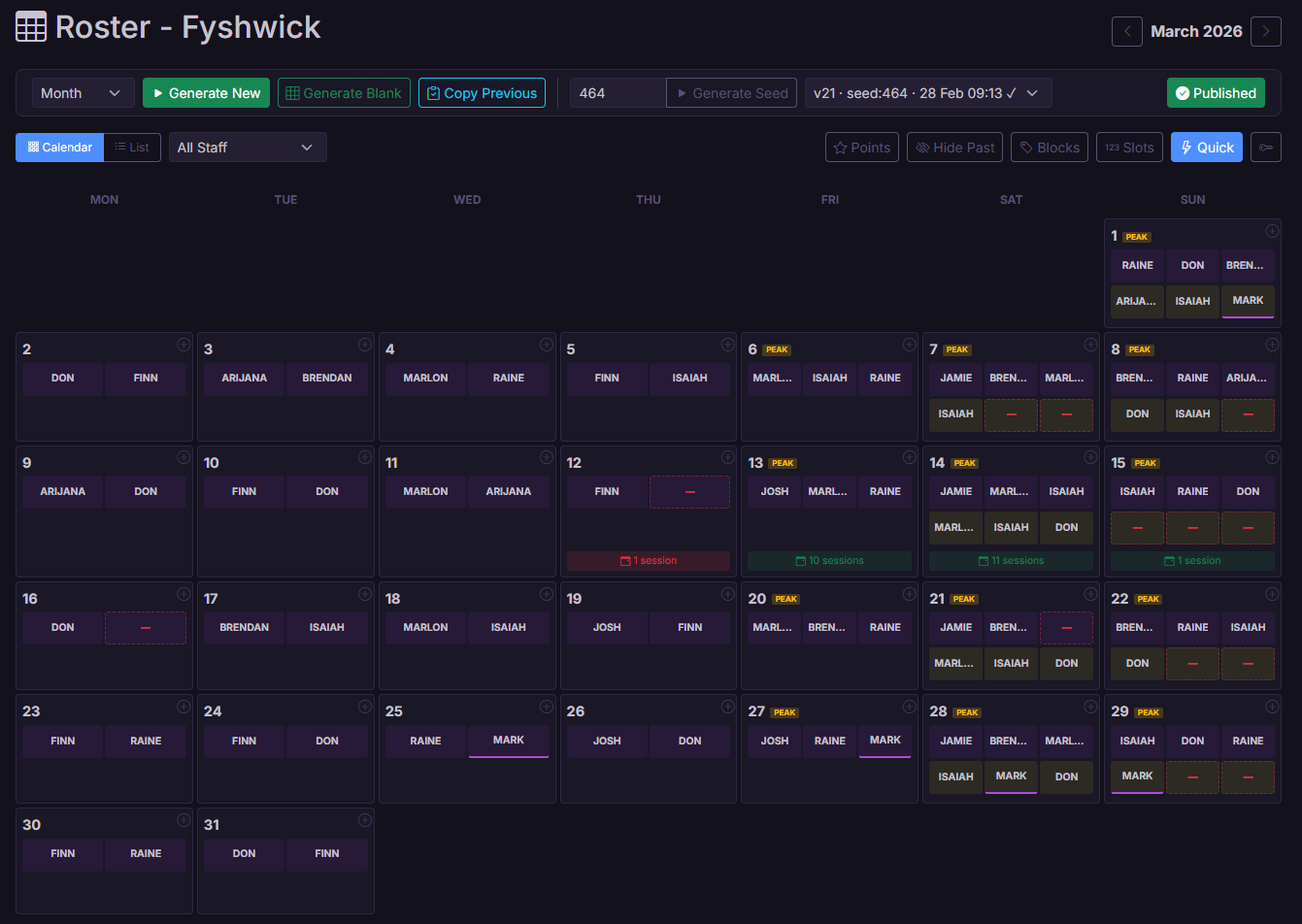
AutoRoster Generation

Generate a fair, balanced roster with one click. Same inputs always produce the same result — no surprises.

Deterministic roster generation using seeded RNG. Fairness ratio (current_points / target_points) ensures balanced distribution. Configurable slot weights, day multipliers, and per-staff modifiers.

Fair Points System

Shifts are distributed evenly across your team. Everyone gets their fair share automatically.

Staff are assigned based on a fairness ratio with configurable slot weights, point modifiers, and day multipliers. Away staff earn phantom points to maintain balance.

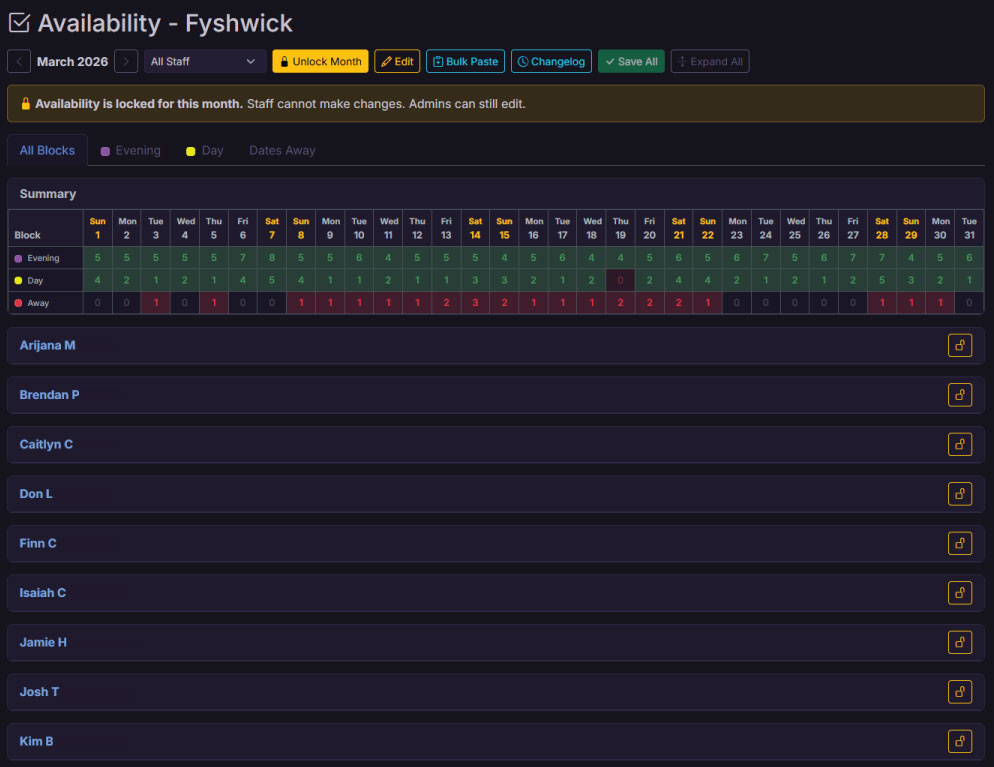
Availability Management

Staff submit their own availability through the portal. Admins can lock months, manage dates away, and view everything at a glance.

Staff submit availability via the portal. Per-month and per-staff locking. Bulk paste import from spreadsheets. All Blocks and Per Block view modes with dates away tracking.

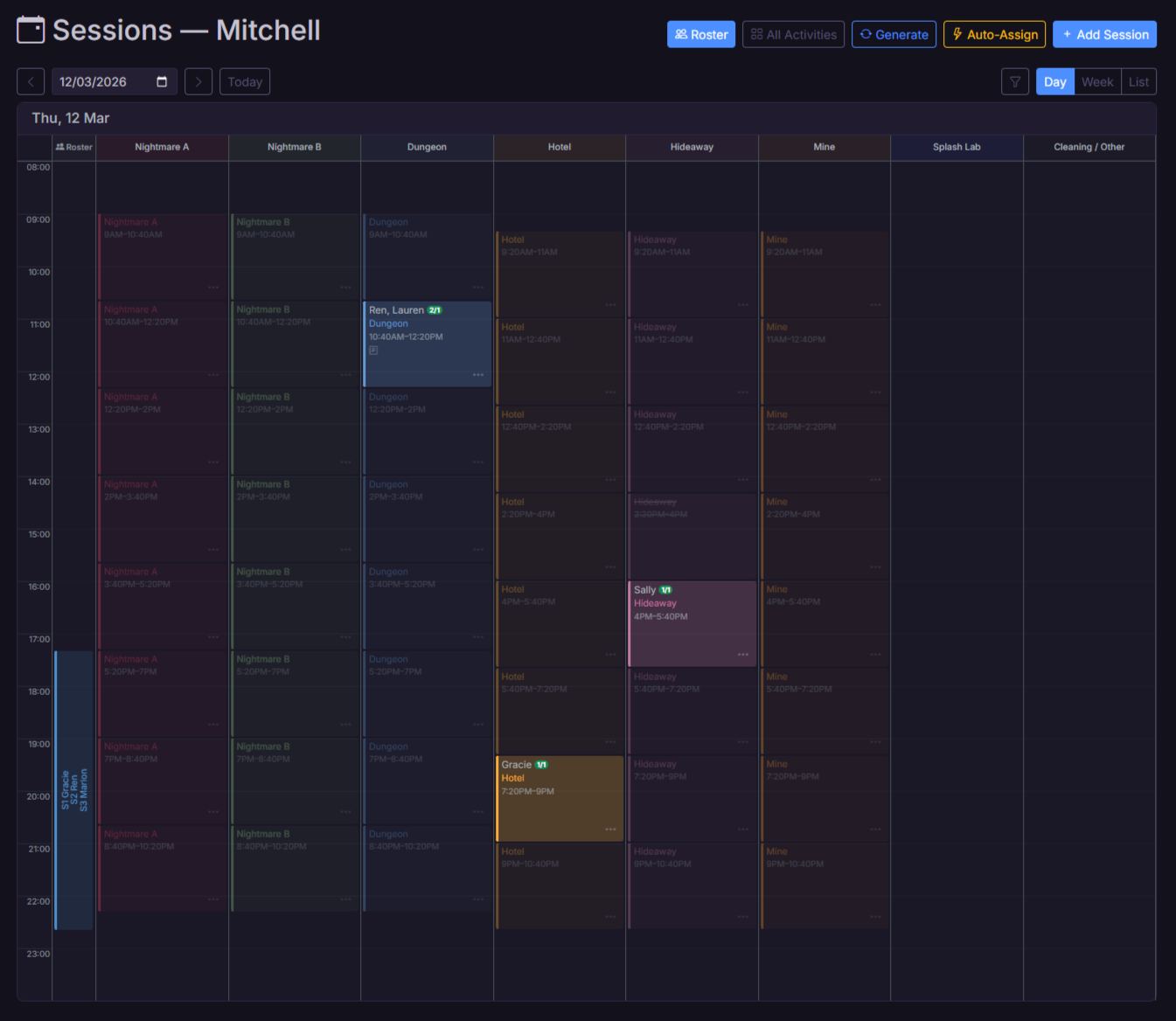
Sessions & Scheduling

Schedule activity sessions throughout the day, assign staff, and see everything on a visual timeline. Perfect for bookings-based businesses.

Visual timeline with activity-type or resource columns. Define activity schedules with multi-slot days, staffing ratios, and phases. Bulk-generate sessions from templates. Staff picker with training and availability checks.

Resources

Map out your physical spaces — rooms, lanes, courts — and see what's happening in each one at any time.

Resource groups and individual resources with activity-type requirements. Timeline switches between activity and resource column modes. Auto-setup from existing activities for quick 1:1 mapping.

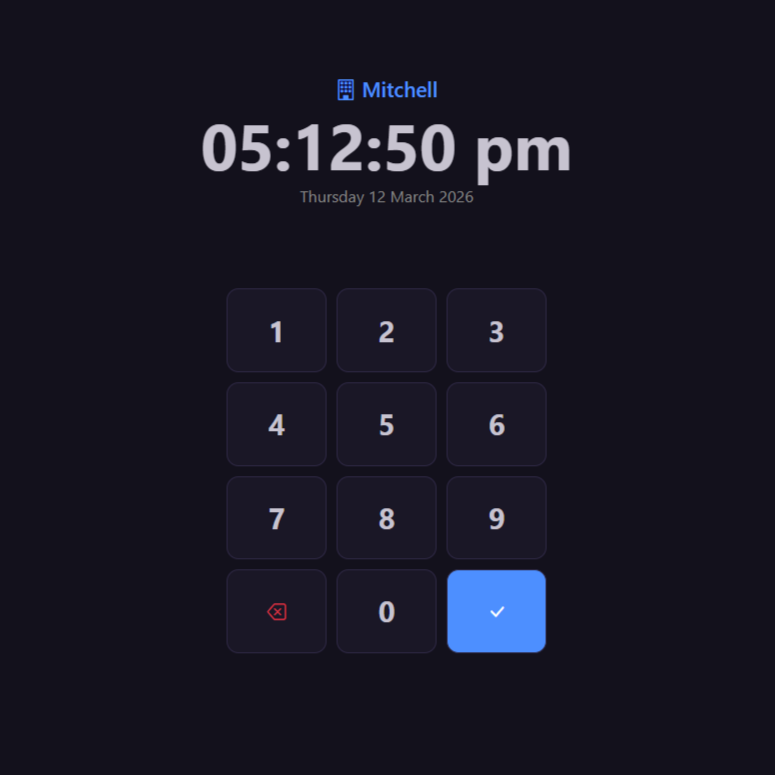
Kiosk Clock-In

Set up a kiosk for staff to clock in and out with a PIN. Track hours and spot late starts at a glance.

Standalone kiosk page for clock-in/out via PIN. Auto-closes stale entries, snaps to payable time boundaries, and flags late clock-outs for review. Cross-location auto-handoff.

Timesheets

View and manage staff hours with payable time tracking, adjustments for over/underpay, reimbursements, easy exports, and a simple approval workflow.

Full timesheet management with actual vs payable time toggle. Hour and dollar adjustments, reimbursement tracking, position-split entries, pay period locking with paid status. Staff totals, CSV export, cost view with pay rate calculations, and time correction requests from staff.

Pay & Wages

Calculate staff pay automatically based on hours worked, with support for penalty rates, casual loading, and super.

Configurable base rates, penalty multipliers (weekend, public holiday, evening, late night), casual loading, superannuation, training wages, and age-based junior rates. Per-location overrides. Adjustment timesheets for over/underpay corrections.

Staff Portal

Self-service portal for staff: view roster and sessions, submit availability, request swaps, claim shifts, and check performance reviews and rewards.

Multi-tab portal with dashboard, roster, sessions timeline, shifts, availability, clock history, tasks, performance reviews, and rewards. Claim open slots, request time corrections, appeal review ratings, acknowledge notices, and manage PINs.

Shift Swaps & Claims

Staff post shifts for cover, others claim them. Mark slots as open so staff can volunteer. Optional admin approval keeps you in control.

Full swap lifecycle: post, claim, approve/deny. Claimable roster slots and sessions with multi-claim support. Training and conflict checks built in. Configurable approval requirements.

Multi-Venue

Manage multiple locations from one account. Staff see all their shifts across venues in one place.

Multi-location management with shared staff. Cross-venue conflict detection prevents double-booking. Per-venue kiosk, Slack, and pay configuration.

Announcements

Post announcements to your team and track who's read them. Scope to a single venue or send to everyone.

Location-scoped or org-wide announcements with read tracking. Expiry dates for auto-cleanup. Staff see unread announcements on their dashboard.

Export & Print

Download or print your roster in seconds. Three layout options for different needs.

Export by block, by day, or by staff. Print-optimised layouts and CSV downloads. Position icons included in exports.

Integrations

Connect with Slack for instant notifications, Bookeo for automatic booking sync, and Xero for payroll export. Each integration is optional and configurable per location.

Slack: per-venue bot with DM notifications for shifts, sessions, swaps, rewards, notices, and reviews. Bookeo: real-time webhook sync for bookings, resources, and session auto-creation. Xero: OAuth 2.0 payroll push with earnings rate mapping and employee import. All individually toggleable.

Pro

Performance Reviews

Create review templates, rate staff on custom criteria, publish results, and track improvement over time. Staff can view scores and flag ratings for appeal.

Template builder with sections, elements, descriptions, and custom rating labels (0-5). Conduct reviews per staff with notes, save as draft or publish. Comparison view with colour-coded deltas. Staff can appeal individual ratings with admin response workflow. Comments thread per review.

Pro

Rewards & Recognition

Award points across custom categories — for great work, reviews, short notice shifts, or anything you want to recognise. Staff see their totals and a leaderboard.

Custom reward categories with icons and colours. Preset actions with point values for one-click awarding. Award from staff page, session picker, or dedicated rewards page. Leaderboard, activity feed, and staff portal dashboard card. Optional Slack DM on award.

Pro

Staff Notices

Issue formal commendations, warnings, or general notices to staff. Track acknowledgements and handle appeals — all with a full audit trail.

Notice templates with configurable severity levels and field prompts. Commendation, warning, and general notice types. Staff acknowledge or appeal via the portal. Admin resolves appeals with written responses. Slack DM on issue. Full audit log integration.

Pro

Training Modules

Build multi-session training checklists with discussed/performed tracking. Trainers work through items during shadow shifts, admins sign off on completion.

Create reusable training templates with sections and checklist items. Assign to staff with optional trainer and due date. Multi-pass session tracking — each shadow shift is a column. Discussed (D) and Performed (P) states with points-based progress. Trainers select which session they're working, previous sessions stay read-only. Bulk assign to new hires. Expiry and recertification support. Staff portal shows progress, admin signs off completion.

Audit Trail

Every action is logged with a plain-English description — who did what, when, and to whom. Searchable and filterable.

Human-readable audit descriptions on all entries. Session context with activity names, times, dates. Staff name resolution. Retroactive description generation for historical entries. Search across action, user, details, and description fields.
Built for how you work

No two workplaces run the same way — AutoRoster adapts to your schedule, your team, and your workflow.

The Escape Room

Appointment-based venue
"Our schedule changes every day depending on bookings, so rostering used to be guesswork. Now I create a provisional roster so staff know roughly when they might work that week. As bookings come in, I just add sessions to the timeline and assign whoever's available and trained. Staff see their sessions instantly in the portal, and if something changes they can swap with a colleague without me chasing messages."
How it works: Create a provisional roster based on staff availability so your team knows when they might be needed. As bookings arrive, add sessions to the timeline and assign trained staff. Staff see their sessions immediately in the portal and can request swaps if something changes.

The Cafe

Regular shifts, variable demand
"We run the same shift times every day, but weekends and holidays need more staff. I set up our shift blocks with different staff counts for peak and off-peak days, collect everyone's availability through the portal, and hit Generate. The AutoRoster balances hours across the team so no one gets stuck with all the quiet shifts or all the busy ones. What used to take me an hour now takes seconds."
How it works: Define your shift blocks with times and staff counts. Mark peak days on the calendar for extra coverage. Staff submit their availability through the portal, then generate a balanced roster in one click. The points system keeps shifts distributed fairly across the team.

The Axe Throwing Bar

Uneven demand, fair shifts
"Mondays and Tuesdays are quiet, but we still need staff on. Before AutoRoster the same people kept getting stuck with those shifts. Now quiet days are worth fewer points and busy Friday and Saturday nights are worth more. The roster balances out automatically so everyone does their share of slow shifts. Plus with the kiosk and timesheets, staff clock in and out and I can export everything straight to payroll."
How it works: Set up shift blocks with different point values — quieter shifts earn fewer points, busy shifts earn more. The roster algorithm factors this into its fairness calculations. Staff clock in and out using the kiosk, and timesheets can be exported to CSV for payroll.

The Games Venue

Multi-room activity centre
"We run multiple game rooms at once, each hosting different activities throughout the day. On the timeline, each room shows up as its own column so I can see exactly what's happening where. When I add a session to a room it only offers the activities that can run there. I always know which staff are running which sessions, in which room, and for how long."
How it works: Create resource groups for rooms or spaces, then link activities to the rooms they can run in. The sessions timeline shows each room as a column. Add sessions directly to the room and only the relevant activities will appear. Assign trained staff and track sessions across the day.

The Trampoline Park

Large casual team, training zones
"We've got more than 30 casual staff and lots of them are uni students who come and go. Getting everyone set up used to take forever. Now I just add their email and they instantly get a portal login. I mark which zones they're trained in — dodgeball, foam pit, ninja course — and the roster won't put anyone somewhere they're not qualified to work."
How it works: Add staff with their email and they automatically receive a portal login. Set up activities or zones and mark which staff are trained for each one. The roster engine checks these training requirements so staff are only assigned where they're qualified.

The Event Crew

Flexible gig-style workforce
"We don't run fixed rosters. Work comes in and we need people to put their hands up. I post shifts as claimable and my crew get a Slack notification straight away. They jump into the portal, claim what suits them, and I approve it. No group texts, no phone calls, no chasing people at 7am."
How it works: Post shifts or sessions as claimable instead of generating a roster. Staff see them in the portal and receive Slack notifications. Multiple staff can claim a slot, and you decide who gets it. Notifications keep everyone informed automatically.

The Restaurant Group

Multiple venues, shared staff
"We run three restaurants and a lot of staff work across more than one location. Before AutoRoster we had to message other managers before rostering someone to make sure they weren't already working elsewhere. Now everything's in one system — if someone is rostered at the city venue, they simply won't appear available at the suburbs venue."

"Staff also love the All Venues view in the portal. One login, one calendar, every shift across every location."
How it works: Add multiple venues under the same account and assign staff to the locations they work at. The roster engine checks for cross-location clashes automatically. Staff see a single calendar with all their shifts across every venue.

Plans & Pricing

No per-staff fees. Pick the plan that fits your venue.

Essential

Core rostering & scheduling
$20/mo
  • Up to 20 staff
  • Up to 2 locations
  • Roster generation & sessions
  • Staff portal & kiosk clock-in
  • Timesheets, pay & wages
  • Availability management
  • Shift swaps & claims
  • Slack & Bookeo integrations
  • Performance reviews
  • Rewards system
  • Training modules
  • Xero payroll export
Start Free Trial

Enterprise

For larger operations
Custom
  • Unlimited staff
  • Unlimited locations
  • Everything in Professional
  • Dedicated onboarding
  • Custom integrations
  • Priority support & SLA
Contact Us

14-day free trial on all plans. No credit card required. Cancel anytime.

Frequently asked questions

Everything you need to know about AutoRoster.

How does it work?
Set up your shift blocks, let staff submit their availability, then generate a roster with one click. Staff can view shifts, request swaps, and manage availability through their own portal. Optional admin approval keeps you in control.
How does fair rostering work?
AutoRoster uses a customisable point system to distribute shifts evenly. Each shift type has a point value, and the algorithm prioritises staff with fewer accumulated points. You can adjust multipliers per staff member to fine-tune the balance.
What's the difference between roster shifts and sessions?
Roster shifts are regular repeating blocks (e.g. Morning, Evening) auto-generated based on availability. Sessions are individual bookable activities on a timeline (e.g. Escape Room at 2pm, Bowling at 4pm). Use one or both depending on how your business operates.
Can I manage multiple venues?
Yes. Handle multiple venues from a single account, share staff across them, and everyone sees all their shifts in one place. Cross-venue conflict checking prevents double-booking.
How many staff can I add?
Essential includes up to 20 staff and 2 locations. Professional includes up to 40 staff and 3 locations. Enterprise plans support unlimited staff and locations. All plans include unlimited admin accounts with no per-user fees.
What does it cost?
Two plans: Essential ($20/mo) covers core rostering, scheduling, Slack and Bookeo integrations for up to 20 staff and 2 locations. Professional ($30/mo) adds performance reviews, rewards, training modules, and Xero payroll export for up to 40 staff and 3 locations. Pay yearly and get 2 months free ($200/yr and $300/yr). Enterprise pricing available for larger operations. No per-staff fees.
Does it handle pay calculations?
Yes. Set base hourly rates, penalty multipliers for weekends and holidays, casual loading, and superannuation. View cost breakdowns alongside timesheets and export everything for payroll.
Why AutoRoster?
Built to solve our own rostering headaches, now shared with the world. AutoRoster is lightweight, affordable, and purpose-built for shift-based workplaces like escape rooms, activity centres, cafes, and hospitality venues. From rostering and timesheets to performance reviews, training, and payroll — it's everything you need in one place, without the complexity or cost of enterprise tools.
I have a feature request
We'd love to hear it. You can submit feature requests and vote on ideas through the in-app roadmap, or get in touch via the contact form below. We continuously improve based on real user feedback.

Get in touch

Questions? We'd love to hear from you.